
By default, our displays are configured to turn on Monday through Saturday from 8:00 AM to 10:00 PM. If you would like to adjust the operating times to match your opening hours, please follow these steps:
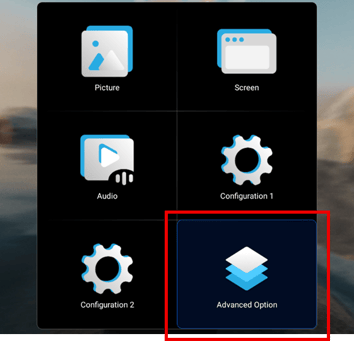
- Press the „HOME“ button on the remote control.
- Use the arrow keys to navigate to the menu item „Advanced Options“.
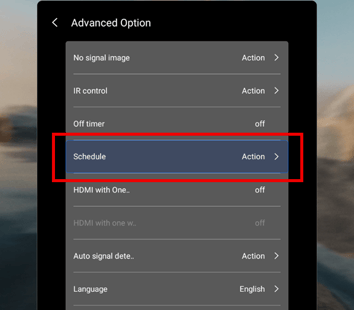
- Select „Schedule“ and confirm with the right arrow key.
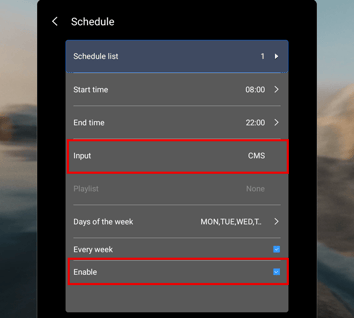
- Set your desired time schedule (days and times). The device will then automatically turn on and off at the specified times.
Important (ATTENTION): In the „Input“ section, make sure to set „CMS“, as this is the source for the media playback.
Then activate the schedule with „Enable“.
- To exit. press the „back“ button until you return to clip playback.
Alternatively, instead of adjusting the time settings on the device, you can also connect a timer switch to the power supply.